
Promotion Code Capabilities
The purpose of this document is to provide a high-level overview of the promotion code capabilities offered by the Cheetah Messaging platform.
Promotion codes (often referred to as "promo codes" or "coupon codes") are text strings that represent a special offer or marketing discount sent to a consumer, such as "free shipping" or "10% off your entire order," for example. Promo codes are often sent within a marketing message, with instructions to the consumer to provide the promo code when they make a purchase, in order to receive the discount.
The platform also supports the use of barcodes, which are a specific type of promo code that utilizes a graphical image instead of (or sometimes, in addition to) the text string. Barcodes are often used by clients that have retail stores, so customers can print out the offer with the barcode, and bring it into the store. The point of sale system will then scan the barcode and apply the corresponding discount.
Promo codes are beneficial to a marketer because they provide a definitive link between a purchase and the marketing message that drove that purchase. This link is very useful when performing response attribution, and determining the value and effectiveness of a marketing Campaign.
Types of promo codes
Messaging supports two basic types of promo codes: static and dynamic.
A static promo codes means that every consumer in the Campaign receives the same code with the same offer.
Dynamic promo codes are more flexible. When you set up your Campaign in Messaging, you can define specific rules that control what promo codes get assigned to each recipient based on metadata fields in your database.
Both static and dynamic promo codes must have an expiration date assigned to them. Expiration dates can be calculated based on a duration (for example, a code is valid for two weeks after the marketing message is sent), or using a hard stop date (for example, a code is valid until July 1, 2017).
Process flow
Importing promo codes
Promotion codes must be generated by the client, and sent to Messaging. The platform itself does not generate promo codes; it only stores them and assigns them.
The diagram to the right depicts the high-level processing flow for importing promo codes.
As noted in the diagram below, the list of promotion codes can be sent as a flat file via SFTP and imported into Messaging, or sent as an API Post. Cheetah Digital's best practice is to use the first method -- a flat file and load via SFTP -- as this method allows for logging of imported promotion codes.
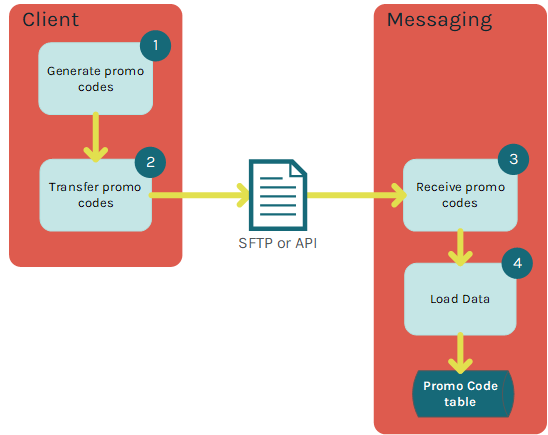
Table design
The promotion code tables within Messaging can be customized to meet a client's specific requirements, but generally speaking, the platform utilizes two tables: a main table that stores the client-provided promotion code as the unique identifier for the table, and a second "detail" table that stores additional information about the promo code usage.
The standard design of the main Promotion Code table is listed below. This table contains all the unique promotion codes that can be assigned to recipients. This table uses a many-to-one join to the table(s) from which messages will be sent. As promotion codes are assigned, they will be marked as "Assigned," along with a datetime stamp.
| Field Name | Field Description |
|---|---|
| promo_code | Unique ID for the Promo table |
| promo_ID | Foreign Key to the Promo Code Detail table |
| concept_cd | Used to identify the brand of Business Unit to which the promo code belongs |
| expDate | Date the promo code will expire. Can be used for personalization within a Campaign/ |
| expDate2 | Optional second date the promo code will expire. Can be used for personalization within a Campaign. |
| expDate3 | Optional third date the promo code will expire. Can be used for personalization within a Campaign. |
| assigned | Flag to identify if a promo code has been assigned to a recipient |
| date_assigned | Date when a promo code has been assigned to a recipient |
| campaign_id | Messaging Campaign ID that promo code was used in |
| msg_id | Unique identifier for the message that was sent corresponding to the unique combination of Campaign / record sent combination |
| pk_id | Messaging primary key of the record that was assigned the promo code |
| campaign_mode_id | Utilized when it's necessary to set promo codes used for Campaign proofing back to "unassigned" |
The standard design of the Promotion Code Detail table is listed below. This table will contain details specific to the promotion that can be used for filters as well as personalization within a message. Other details, such as start / end dates for the promotion, and the status of the promotion, are also included in this table. The main Promo table will join to the detail table using a many-to-one join on the Promo_ID.
| Field Name | Field Description |
|---|---|
| Promo_ID | Type of Promo code. Used in Campaign setup to identify what type of promo code can be assigned. |
| concept_cd | Used to identify the brand or Business Unit to which the Promo Code belongs to |
| offer_amount | Numeric value such as "10.00" for "$10.00 off" or "15" for "$15.00 off" |
| offer_type | Type of offer such as "% off" or "$ off" |
| Promo_Type | 5 off of %50 |
| Promo_Desc | Description of the Promotion, used for personalization of promo description details in emails or web pages |
| Promo_Disclaimer | Disclaimer copy for the Promotion, used for any disclaimer personalization in emails or web pages |
| Start_Date | Promo code start date |
| End_Date | Promo code end date |
| Days_to_Expire | Defines how many days before the valid_end_date to change the Promo_status to "expired" |
| Promo_Status | Defines whether the promo code is active or expired |
Campaign configuration
When building your marketing Campaign in Messaging, the platform allows you to assign either Static or Dynamic promotion codes. If using Dynamic promo codes, you can use Campaign metadata to determine what promo code is assigned to what recipient. Messaging can be configured to use metadata to also configure various details of the promotion code, such as:
-
Promo code type
-
Expiration Date
-
Number of days a promotion code is valid
After assigning a promo code to a recipient, the platform logs all of the relevant information about this usage -- the recipient, the Campaign, the date, etc.
Barcodes
Barcodes are special promo codes that consist of a graphical image. Messaging supports the inclusion of barcodes into your email Campaign. Barcodes are also available in the print Channel, but only if you're using the PageFlex software to create the print content, and only if you have the necessary PageFlex plug-ins installed. This document focuses only on the email Channel.
Barcodes sent via an email message can be printed out by the consumer and brought into a store to gain access to a special offer or promotion. Or the consumer can bring up the email message containing the barcode on his or her smartphone, and scan the barcode right from the phone.
Using Barcodes in a Campaign
As with other promo codes, Messaging supports the use of Static and Dynamic barcode assignment. You can configure your email Campaign to generate a static barcode for each Campaign (all recipients of the Campaign receive the same barcode) or unique barcodes for each user (each individual receives a unique barcode).
Barcodes are inserted within the HTML version of a Campaign using an image tag. The platform supports linear barcodes and two-dimensional barcodes.
When configuring barcodes within your Campaign, you have the option of supplying several additional parameters:
-
Hide / display the readable digits beneath the barcode image.
-
Determine the image dimensions within the email message.
-
Select an encoding type.
The encoding type controls the technical details of the barcode, such as the width of the bars, and the supported character set (for example, numeric-only, or alphanumeric). Messaging supports the following encoding types:
-
EAN, EAN13, EAN-13, EAN8, EAN-8
-
UPC, UPC-A, UPC-E
-
ISBN
-
39, Code39
-
128, Code128, 128A
-
128C, Code128C
-
128B, Code128B
-
I25, Interleaved 2 of 5
-
128RAW
-
CBR, Codabar
-
MSI
-
PLS, Plessey
-
Code93, 93
-
2D PDF417
